The virtual printing feature is globally disabled…

This little warning can pop up if you are using VMware Workstation.

VMware Workstation - The virtual printing feature is globally disabled on this system
The virtual printing feature is globally disabled on this system, and will not be enabled for… Virtual device ‘serial0’ will start disconnected.

The resolution is pretty simple:

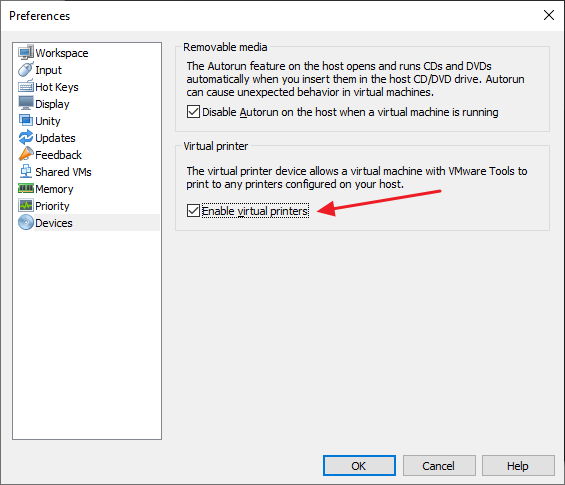
Open VMware Workstation and go to Edit > Preferences > Devices. Uncheck the option: “Enable virtual printers

VMware Workstation Preferences - Enable virtual printers

If you are not going to use printing functionality from your VMs, go to each VM Settings > Printer and remove the checkbox next to “Connect at power on“.
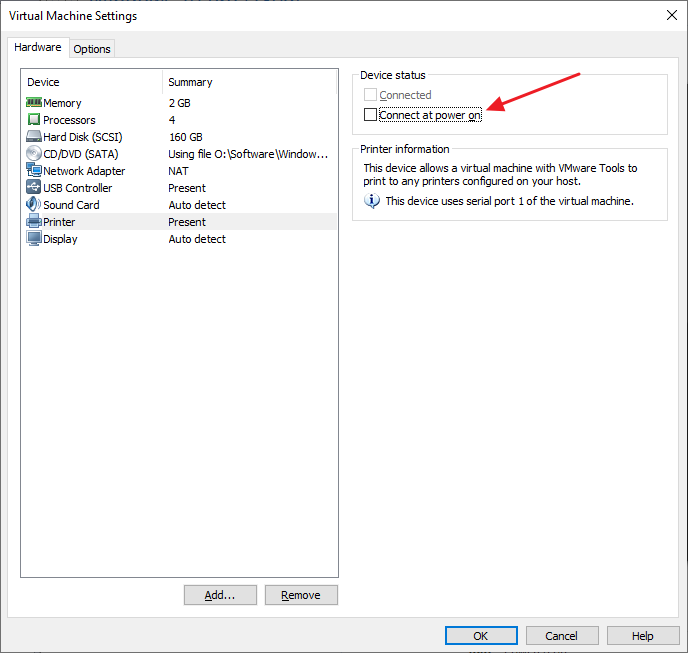

VMware Workstation Preferences - Connect at power on

Leave a Reply

Your email address will not be published. Required fields are marked *

Share the Post:

Related Posts