
A few people contacted me from a business client in Oxford with a minor IT issue. Adobe Acrobat Reader would keep popping the error below:
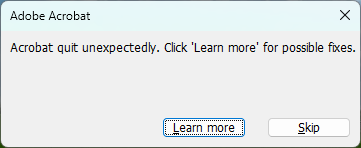
The Adobe Reader wasn’t actually crashing, however, it was quite annoying receiving these errors multiple times per day. The software was up to date and the “Learn More” link was completely useless.
After a bit of research, I discovered that the issue was caused by the Adobe Reader feature that displays PDF file previews inside Windows Explorer thumbnails. Disabling this feature and restarting the PC fixed the issue for all affected users. Obviously, this also stopped Windows Explorer from displaying PDF previews, but none of my Oxford clients were bothered by that.
The feature can be disabled in the Adobe Acrobat Reader menu: Edit > Preferences > General > Enable PDF thumbnail previews in Windows Explorer.

February 2024
Adobe Acrobat Reader v2023.008.20533
Windows 11 Pro (23H2)