Your memory card says 1TB. It might be lying to you!
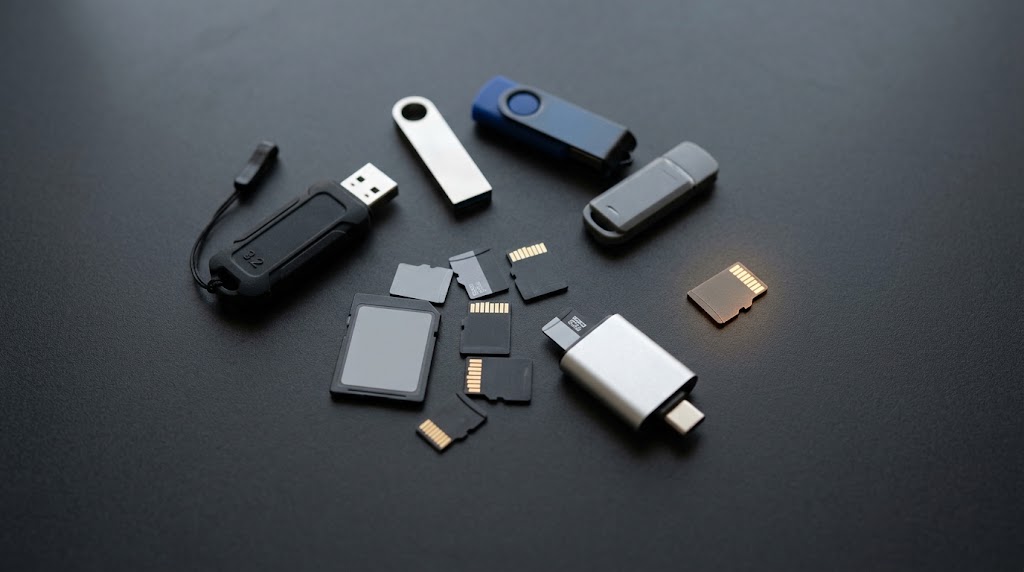
Every week, thousands of memory cards and USB sticks are sold on Amazon, eBay, AliExpress and Facebook Marketplace that are not what they claim to be. A card sold as 1TB might be a fake SD card and contain only 32GB of actual storage. The packaging looks right. Your computer says 1TB. Windows will happily copy files onto it all day long.
And then, months later, you open the folder with your holiday photos in it and half of them won’t open.
This article explains why that happens, and shows you how to test any card or drive you own using free tools, on Windows, Mac or Linux. You don’t need to be technical to follow it. If you’d rather someone just did it for you, we’re an IT support company based in Bicester and we help businesses and households across Oxfordshire and Buckinghamshire with exactly this sort of thing.
The short version
- Counterfeit cards and drives are programmed to lie about their capacity.
- Your computer believes the lie. So does Windows Explorer, macOS Finder, and Disk Management.
- Copying files to a fake drive appears to work. The data is silently thrown away.
- The only reliable test is to write data across the whole drive and read it all back.
- Free tools do this: ValiDrive and H2testw on Windows, F3 on Mac and Linux.
- Test every new card within your returns window, not six months later.
How does a fake memory card actually work?
Every storage device has a small controller chip inside it that tells your computer how big it is. On a genuine card, that number is honest. On a counterfeit, it has been deliberately reprogrammed.
Think of it like a notebook with 32 pages, where someone has changed the table of contents to run from 1 to 1,000. You can write on page 700. The notebook will accept it quite happily, but it has nowhere to put it, so it writes over page 4 instead, or simply throws the data away.
That is exactly what a fake drive does. Once you fill past its real capacity, the card has nowhere to put anything new. Some fakes quietly throw the data away. Others write it over the top of files you saved earlier, destroying those too. Either way, the card reports that everything saved perfectly; there’s no error, no warning.
This is why fakes are so much worse than an ordinary faulty drive. A dead drive tells you it’s dead. A fake drive keeps working, just not in a way you expect.
It isn’t only counterfeits
Genuine cards wear out too. Flash memory has a finite number of write cycles, and cards that live in dashcams, security cameras, drones or Raspberry Pis get hammered far harder than most people realise. A worn card typically starts by getting slow, then begins returning corrupted files, then fails outright.
The same tests catch both problems, which is why they’re worth knowing about even if you only ever buy from reputable shops.
Why won’t Windows or my Mac just tell me?
Because your operating system has no way to independently check. It asks the drive how big it is, and the drive answers. There’s no second opinion available.
A few things people commonly try that do not work:
- Looking at the properties or Disk Management. These read the reported capacity. Which could be a lie.
- Formatting the card. Formatting rebuilds the index. It doesn’t verify that the storage behind the index exists.
- Running CHKDSK or Disk Utility First Aid. These check the filing system for logical errors, not whether the physical storage is real.
- A read-only “surface scan”. On a mostly empty card, most of what gets read is blank space that was never written. It proves very little.
The only test that means anything is: write a known pattern across the entire drive, then read it all back and check it matches. That’s what the tools below do.
Which tool should I use?
| Tool | Works on | Speed | Best for |
|---|---|---|---|
| ValiDrive | Windows | The same whatever the capacity | Large drives, especially suspiciously cheap high-capacity USB sticks. |
| H2testw | Windows | Roughly an hour per 32GB | The thorough, definitive test. Also checks data integrity, not just capacity. |
| F3 | Mac, Linux | Roughly an hour per 32GB | The same thorough test for Mac and Linux users. Command line. |
Which one to reach for depends mostly on size. ValiDrive checks a fixed number of locations spread across the drive, so it takes roughly the same time whether the drive is 1GB or 2TB. That makes it excellent value on a large drive, where a full test would run for hours, and poor value on a small card, where H2testw or F3 will finish sooner and test everything rather than a sample.
As a rule of thumb: large drive, or in a hurry, use ValiDrive. Small card, or you want certainty, use H2testw or F3.
Before you start: three things
- Back up anything on the card. A proper test fills the drive completely. Assume everything on it will be lost.
- Format the card first, as a single partition. These tools test free space, so a card with files on it only gets partly tested.
- Use a decent card reader and give it time. A cheap or failing reader produces misleading results, we’ve seen a faulty front-panel reader throw errors that looked exactly like a dying card. Plug directly into the computer rather than through a hub where you can.
How to test a memory card on Windows
Quick check: ValiDrive
ValiDrive is free software written by a prominent American software engineer and security researcher Steve Gibson (Gibson Research Corporation). It samples hundreds of locations spread across the whole drive and checks whether real storage exists at each one. Download it from grc.com.
- Run the downloaded file, there is nothing to install.
- Insert you USB drive.
- Click to start the scan.
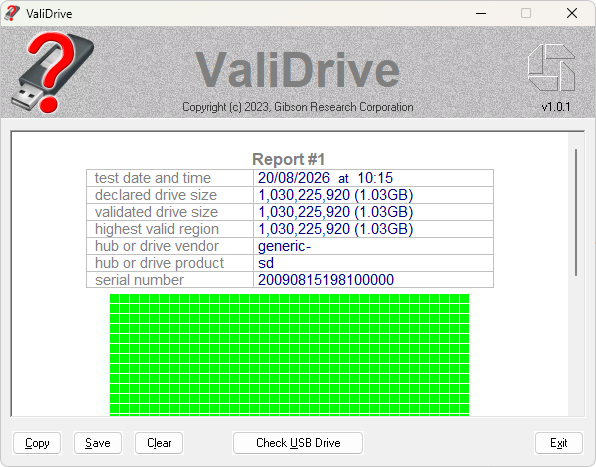
Don’t be surprised if it takes a while. ValiDrive tests hundreds of separate locations dotted across the drive, and jumping about like that is the slowest thing you can ask flash memory to do, particularly SD cards, which are built for steady sequential writing. On a large USB drive that’s still far quicker than a full test. On a small memory card it can easily take longer than simply testing the whole thing with H2testw.
You’ll get a map of the drive. Green means real storage was found. Red means the drive claimed space that isn’t there. A genuine drive comes back entirely green with its declared size matching its validated size.
One caveat: ValiDrive checks 576 locations spread across the drive rather than every byte. That’s a deliberate trade-off for speed, and it makes it very good at catching capacity fraud, but a sampling test can never be a cast-iron guarantee. If the drive is going to hold something irreplaceable, follow up with a full test.
Thorough check: H2testw
H2testw was written by Harald Bögeholz at the German computing magazine c’t, and it remains the tool most people in the industry reach for. Download it from heise.de — the page is in German, but the program itself offers English.
- Unzip the download and run
h2testw.exe. Again, nothing to install. - Click English at the top.
- Click Select target and choose your card’s drive letter.
- Leave all available space selected.
- Click Write + Verify and go and do something else.
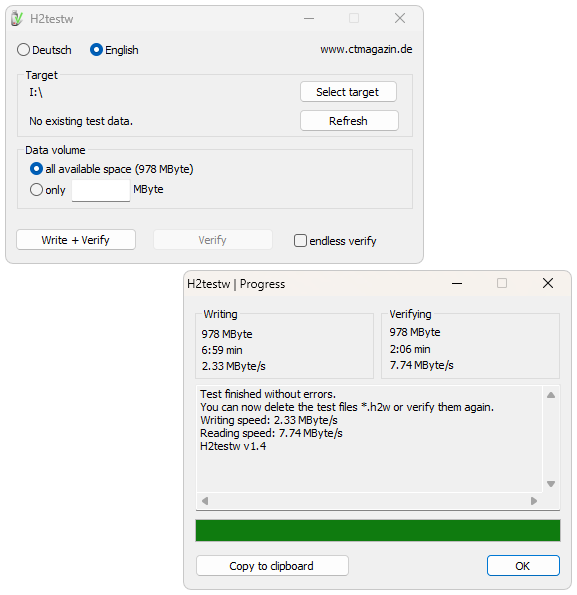
H2testw fills the free space with files containing a known pattern, then reads them all back and compares. When it finishes you want to see a message confirming the test finished without errors, along with your read and write speeds.
If it reports data being corrupted, changed, or overwritten, the drive has failed. “Overwritten” in particular is the signature of a counterfeit: data written to one place came back from another.
Afterwards, delete the .h2w files it created, or just reformat the card.
How to test a memory card on a Mac
Mac users need F3 – short for “Fight Flash Fraud”. It does the same job as H2testw and is run from the Terminal, but it’s genuinely just two commands.
First, install Homebrew if you don’t already have it. Homebrew is a widely used tool for installing free software on macOS; its website gives you a single line to paste into Terminal.
Then open Terminal (press Cmd+Space, type “Terminal”, press Enter) and run:
brew install f3With your card plugged in and formatted, run the write test. Replace CARD with whatever your card is actually called – you’ll see the name on your desktop or in Finder’s sidebar:
f3write /Volumes/CARDWhen that finishes, read it all back:
f3read /Volumes/CARDF3 reports how many sectors came back correct and how many were lost, split into corrupted, changed or overwritten. Anything other than a clean result means the card can’t be trusted. Delete the .h2w files it leaves behind when you’re done.
How to test a memory card on Linux
F3 is in the standard repositories on most distributions. On Ubuntu, Debian or Linux Mint:
sudo apt install f3Then, with the card mounted:
f3write /media/yourname/CARD
f3read /media/yourname/CARD
Linux users also get f3probe, which detects fake capacity in seconds rather than hours by testing the raw device directly. It’s much faster, but it destroys everything on the card, so only use it on a card you’ve already emptied:
sudo f3probe --destructive --time-ops /dev/sdXBe careful to get the device name right. Pointing that at the wrong drive will wipe it.
How do I read the results?
A clean pass means every byte you wrote came back exactly as written, and the drive really does hold what it claims. You can trust it.
Overwritten or wrapped data means it’s a counterfeit. There is no fix worth having. Stop using it.
Corrupted or changed sectors usually means genuine but failing hardware. A worn-out card, or occasionally a bad reader. Retest in a different reader before condemning it.
Very slow write speeds are worth noticing even when the test passes. A card that starts at 20MB/s and collapses to a crawl is working hard internally to cope with failing memory. It’s on its way out.
How to avoid buying a fake in the first place
- Be suspicious of the price. Genuine flash storage has a floor price. A 2TB stick for £15 does not exist.
- Check who is actually selling it. On Amazon, “sold by” matters more than the brand on the listing. Third-party marketplace sellers are where most fakes originate.
- Prefer known brands from known retailers. SanDisk, Samsung, Kingston, Lexar and Integral bought from the manufacturer, Currys, Argos or a proper computer supplier.
- Sanity-check the capacity. Very high capacity microSD cards are expensive and comparatively rare. If it seems too generous, it is.
- Test it the day it arrives. Everything above is far easier to sort out inside the returns window.
Why this matters for local businesses
We see the consequences of this regularly across Oxfordshire and Buckinghamshire. A few of the situations that come up most often:
- Construction and surveying firms around Bicester and Banbury storing site photographs on cheap cards that later turn out to be unreadable.
- Small businesses in Oxford and Kidlington using USB sticks as their only backup, which is a problem even when the stick is genuine.
- Hauliers and fleet operators across Aylesbury, Buckingham and High Wycombe finding that dashcam footage isn’t there when an insurer asks for it.
- Photographers and videographers throughout Oxfordshire losing a shoot to a card that had been quietly failing for months.
The pattern is nearly always the same: nobody checks until the data is needed, and by then it’s gone. Ten minutes with a free tool when the card arrives avoids all of it.
And a broader point worth making – a USB stick or memory card is not a backup. It’s a convenience. Anything you genuinely can’t lose needs to exist in at least two other places, one of them off-site.
Frequently asked questions
How can I tell if an SD card is fake?
You can’t tell by looking, and you can’t tell from what your computer reports. The only reliable method is to write data across the entire card and read it back – using ValiDrive or H2testw on Windows, or F3 on Mac and Linux. A fake card will return data that doesn’t match what was written.
Does formatting fix a fake SD card?
No. Formatting only rebuilds the card’s index of files. It doesn’t create storage that was never there. The card will keep discarding data past its real capacity.
How long does a full test take?
For H2testw or F3, roughly an hour per 32GB, though it depends heavily on the card’s speed and your card reader. A large or slow card can take most of a day. ValiDrive works differently, it checks a fixed number of locations, so it takes much the same time regardless of capacity. That saves hours on a big drive, but on a small memory card it can actually be the slower option.
Can a fake memory card be repaired?
Sort of. Tools exist that can limit a card to its genuine capacity so it at least stops destroying data. But you’d be trusting a device built by someone who deliberately set out to deceive you, so it isn’t something we’d recommend for anything important. Return it and get your money back.
Do I need to test brand new cards from a reputable shop?
Fakes are far less likely through official retail channels, but counterfeit stock does occasionally reach mainstream retailers through third-party sellers. If the card is going to hold something you can’t replace, a quick test on arrival is cheap insurance.
Are these tools safe to use?
Yes, all three are long-established, free, and widely used by IT professionals. Download them from the official sources linked above rather than from third-party download sites, which sometimes bundle unwanted extras.
Need a hand with this?
If you’d rather not work through this yourself, or you’ve already lost data and need to know what can be recovered, we can help. AGGA IT provides friendly, straightforward IT support in Bicester, Oxford and across Oxfordshire and Buckinghamshire. You deal with the same person every time, and there are no long-term contracts.
We work with small businesses, home offices and households on backup strategy, data recovery, hardware faults and everything in between. Get in touch and tell us what’s going on.