
This issue recently occurred to one of our Oxford client’s guest users. They received an invitation to access a shared file (via Microsoft 365 SharePoint). However, after logging in with the Microsoft account which received the email invitation, they were getting the following error:
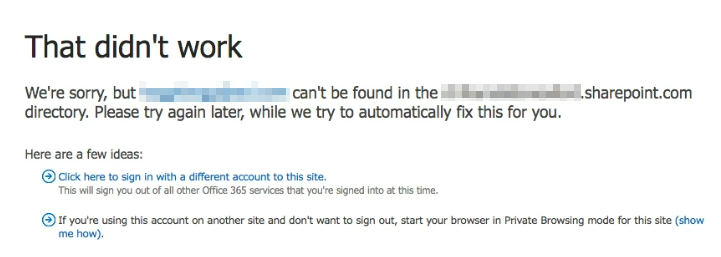
We’re sorry, but can’t be found in the company-name.sharepoint.com directory. Please try again later, while we try to automatically fix this for you.
was one of their other email addresses, not the one to which the file was shared and not the one they were signing in with (which was ). This issue normally occurs when the user is already signed in with the wrong Microsoft account or is signed in with multiple Microsoft accounts. In such cases opening the shared file link in the Incognito / inPrivate browser window normally fixes the issue.
This wasn’t the case here. The user was signing in with the correct Microsoft account () in Incognito mode, but the error message was still referring to a completely different email address ().
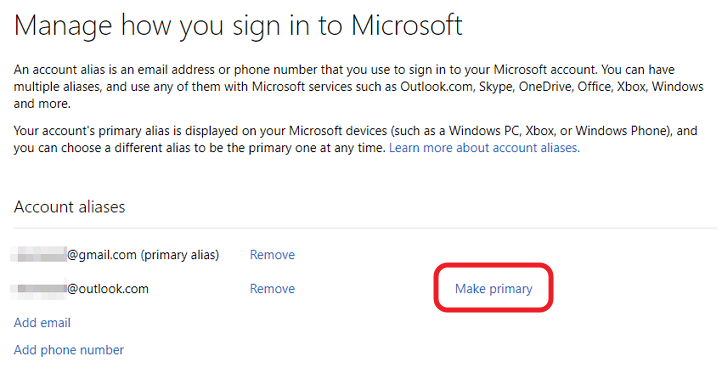
After a quick screen share session, everything became clear. The Microsoft account the user was signing it to, had multiple aliases. The primary email address was , and was only an alias. Even though Microsoft allows to sign in with an alias, the actual account ID is always the primary email address (), which in this case didn’t match the email where the file was shared.
One option would have been to ask the original sender to resend the invitation to address. However, the user actually preferred to make their primary email address. After we did that, the error immediately went away they could access the shared file with no issues.
To change which email address is the primary address:
- Log in to your Microsoft Account at https://account.microsoft.com/
- Click on Your Info > Edit Account Info
- Click Make Primary next to the alias you want to convert to the primary email address.
June 2024
AGGIA Oxford IT Support