One of our clients in Oxford reported an issue where Vegas Movie Studio 17 would randomly freeze during editing forcing him to kill the application in the Task Manager (and lose any unsaved progress).
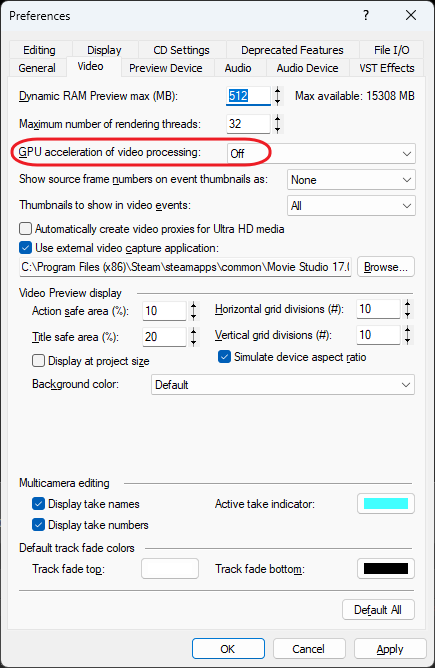
After some research and experimenting we found that the issue was caused by GPU acceleration feature (the PC had Nvidia GeForce GTX 970 graphics card). After disabling GPU acceleration, all freezes and crashes went away.
This can be done in Vegas Movie Studio Options > Preferences > Video. Set GPU acceleration of video processing to Off.
February 2025
Oxford, Oxfordshire
Windows 11 Pro
Vegas Movie Studio 17.0